Nuffnang

Monday, April 13, 2015

VMware Fault Tolerance (FT) in Vsphere 6.0

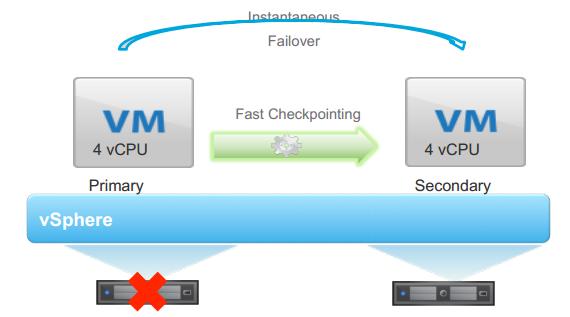
VMware Fault Tolerance (FT) is being one of my favorite feature but because of its vCPU limitation, It was not helping to protect the Mission Critical applications. With vSphere 6.0, VMware broken the limitation lock of Fault Tolerance. FT VM now Supports upto 4 vCPUs and 64 GB of RAM (Which was 1 vCPu and 64 GB RAM in vSphere 5.5). With this vSMP support, Now FT can be used to protect your Mission Critical applications. Along with the vSMP FT support, There are lot more features has been added in FT with vSphere 6.0, Let’s take a look at what’s new in vSphere 6.0 Fault Tolerance(FT).
vSphere 6.0 - FT_1Graphic thanks to VMware.com

Benefits of Fault Tolerance

  • Continuous Availablity with Zero downtime and Zero data loss
  • NO TCP connections loss during failover
  • Fault Tolerance is completely transparent to Guest OS.
  • FT doesn’t depend on Guest OS and application
  • Instantaneous Failover from Primary VM to Secondary VM in case of ESXi host failure

What’s New in vSphere 6.0 Fault Tolerance

  • FT support upto 4 vCPUs and 64 GB RAM
  • Fast Check-Pointing, a new Scalable technology is introduced to keep primary and secondary in Sync by replacing “Record-Replay”
  • vSphere 6.0, Supports vMotion of both Primary and Secondary Virtual Machine
  • With vSphere 6.0, You will be able to backup your virtual machines. FT supports for vStorage APIs for Data Protection (VADP) and it also supports all leading VADP solutions in Market like symantec, EMC, HP ,etc.
  • With vSphere 6.0, FT Supports all Virtual Disk Type like EZT, Thick or Thin Provisioned disks. It supports only Eager Zeroed Thick with vSphere 5.5 and earlier versions
  • Snapshot of FT configured Virtual Machines are supported with vSphere 6.0
  • New version of FT keeps the Separate copies of VM files like .VMX, .VMDk files to protect primary VM from both Host and Storage failures. You are allowed to keep both Primary and Secondary VM files on different datastore.
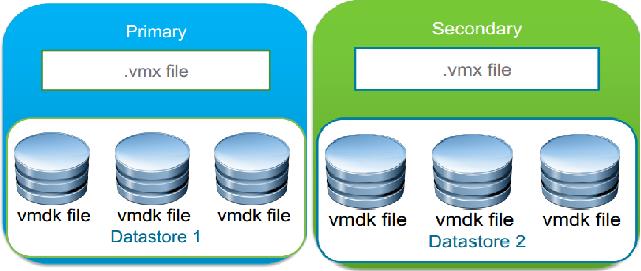
vSphere 6.0 - FT_2 Graphic thanks to VMware.com

Difference between vSphere 5.5 and vSphere 6.0 Fault Tolerance (FT)
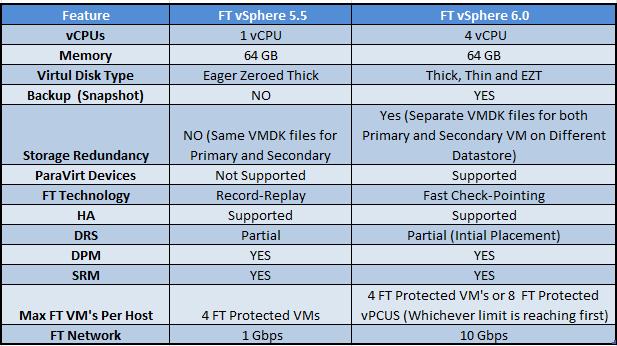
Difefrence between FT 5.5 amd 6.0

Sunday, April 5, 2015

vCenter Server 6.0

In vSphere 6.0, you will notice considerably new terms, when installation vCenter Server 6.0. As similar to the previous versions of vCenter Deployment, You can install vCenter Server on a host machine running Microsoft Windows Server 2008 SP2 or later or you can deploy vCenter Server Appliance (VCSA). With vSphere 6.0, There are 2 different new vCenter Deployment Models.
  • vCenter with an embedded Platform Services Controller
  • vCenter with an external Platform Services Controller
One of the Considerable Change, you will notice with vCenter Server installation is deployment models and embedded database. Embedded database has been changed from SQL express edition to vFabric Postgres database. vFabric Postgres database embedded with vCenter installer is suitable for the environments with up to 20 hosts and 200 virtual machines and vCenter 6.0 continuous to support Microsoft and Oracle Database as external database. with vCenter Upgrades, where SQL express was installed will be converted to vPostgres. Let’s review the System requirements to install vCenter 6.0:
Supported Windows Operation System for vCenter 6.0 Installation:
  • Microsoft Windows Server 2008 SP2 64-bit
  • Microsoft Windows Server 2008 R2 64-bit
  • Microsoft Windows Server 2008 R2 SP1 64-bit
  • Microsoft Windows Server 2012 64-bit
  • Microsoft Windows Server 2012 R2 64-bit
 Supported Databases for vCenter 6.0 Installation:
  • Microsoft SQL Server 2008 R2 SP1
  • Microsoft SQL Server 2008 R2 SP2
  • Microsoft SQL Server 2012
  • Microsoft SQL Server 2012 SP1
  • Microsoft SQL Server 2014
  • Oracle 11g R2 11.2.0.4
  • Oracle 12c

Components of vCenter Server 6.0:

There are two Major Components of vCenter 6.0:
  • vCenter Server: vCenter Server product, that contains all of the products such as vCenter Server, vSphere Web Client,Inventory Service, vSphere Auto Deploy, vSphere ESXi Dump Collector, and vSphere Syslog Collector
  • VMware Platform Services Controller: Platform Services Controller contains all of the services necessary for running the products, such as vCenter Single Sign-On, License Service and VMware Certificate Authority

vCenter 6.0 Deployment Models:

vSphere 6.0 introduces vCenter Server with two deployment model. vCenter with external Platform Services Controller and vCenter Server with an embedded Platform Services Controller.

vCenter with an embedded Platform Services Controller:

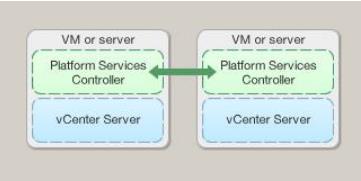
All services bundled with the Platform Services Controller are deployed on the same host machine as vCenter Server. vCenter Server with an embedded Platform Services Controller is suitable for smaller environments with eight or less product instances.
vCenter 6.0 with an embedded Platform Services Controller

vCenter with an external Platform Services Controller:

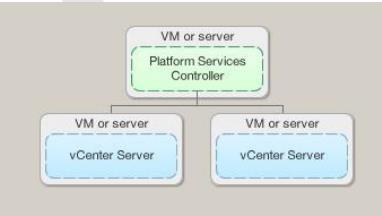
The services bundled with the Platform Services Controller and vCenter Server are deployed on different host machines.You must deploy the VMware Platform Services Controller first on one virtual machine or host and then deploy vCenter Server on another virtual machine or host. The Platform Services Controller can be shared across many products. This configuration is suitable for larger environments with nine or more product instances.
vCenter 6.0 with an External Platform Services Controller

Saturday, March 21, 2015

How To Patch and Protect OpenSSL Vulnerability # CVE-2015-0291 CVE-2015-0204

A serious security problem has been found and patched in the OpenSSL Library. Multiple vulnerabilities have been discovered in OpenSSL on 19/March/2015. The Common Vulnerabilities and exposures project identifies the following issues:

  1. OpenSSL 1.0.2 ClientHello sigalgs DoS (CVE-2015-0291) - Severity: High
  2. Reclassified: RSA silently downgrades to EXPORT_RSA [Client] (CVE-2015-0204) - Severity: High
  3. Multiblock corrupted pointer (CVE-2015-0290) - Severity: Moderate
  4. Segmentation fault in DTLSv1_listen (CVE-2015-0207) - Severity: Moderate
  5. Segmentation fault in ASN1_TYPE_cmp (CVE-2015-0286) - Severity: Moderate
  6. Segmentation fault for invalid PSS parameters (CVE-2015-0208) - Severity: Moderate
  7. ASN.1 structure reuse memory corruption (CVE-2015-0287) - Severity: Moderate
  8. PKCS7 NULL pointer dereferences (CVE-2015-0289) - Severity: Moderate
  9. Base64 decode (CVE-2015-0292) - Severity: Moderate
  10. DoS via reachable assert in SSLv2 servers (CVE-2015-0293) - Severity: Moderate
  11. Empty CKE with client auth and DHE (CVE-2015-1787) - Severity: Moderate
  12. Handshake with unseeded PRNG (CVE-2015-0285) - Severity: Low
  13. Use After Free following d2i_ECPrivatekey error (CVE-2015-0209) Severity: Low
  14. X509_to_X509_REQ NULL pointer deref (CVE-2015-0288) Severity: Low

How bad will this actually be?

It is not bad as the heartbleed openssl bug disclosed in April 2014 in the OpenSSL cryptography library. But, new bug can cause "Denial of Service" and crash your services. It is good security practice, to quickly apply the patched version on your system and restart the affected services.

How to find openssl version on a Linux?

The syntax is as follows:

Find openssl version on a CentOS/RHEL/SL/Fedora Linux

openssl version
## or ##
sudo yum list installed openssl
 
Sample outputs:
Fig.01: How to RHEL/CentOS/Fedora Linux Find OpenSSL Version Command


A list of affected Linux distros

I recommend that you upgrade your openssl packages ASAP to avoid any security issues on both client and server systems powered by Linux based distro.
  • RHEL version 6.x
  • RHEL version 7.x
  • CentoS Linux version 6.x
  • CentoS Linux version 7.x
  • Debian Linux stable (wheezy) 7.x
  • Ubuntu Linux 14.10
  • Ubuntu Linux 14.04 LTS
  • Ubuntu Linux 12.04 LTS
  • Ubuntu Linux 10.04 LTS

How to patch on a Linux?

Type the following commands as per your distro version/type:
## how do I find out my distro version? ##
lsb_release -a
## or use ## 
cat /etc/*-release
Sample outputs:
Gif 01: HowTo: Find Out My Linux Distribution Name and Version

CentOS/RHEL/Fedora Linux

Type the following yum command to patch openssl as root user to patch openssl:
sudo yum clean all
To install the updates, use the yum command as follows:
sudo yum update
To only update the OpenSSL package and its dependencies, use the following yum command:
sudo yum update openssl

Debian/Ubuntu Linux

Type the following apt-get commands to patch openssl as root user to patch openssl:
sudo apt-get update
sudo apt-get upgrade
Sample outputs:
Fig.04: OpenSSL patched on a Ubuntu Linux

Do I need to reboot my server/laptop/computer powered by Linux?

Short answer - yes, you need to reboot your computer/server to make all the necessary changes. Sysadmin should plan on updating as soon as possible or use maintenance reboot window:
sudo reboot
Long answer - It depends. You can avoid reboot by restarting required services. Fist, find all services that depend on the OpenSSL libraries, and restart them one-by-one using the service command:
### Debian/Ubuntu find out if service needed reboot ##
checkrestart -v
 
## Generic method ##
lsof | grep libssl | awk '{print $1}' | sort | uniq
 
Sample outputs:
hhvm
mysqld
nginx
php5-fpm
Restart the above services one-by-one, run:
sudo service restart hhvm restart
sudo service restart mysqld restart
sudo service restart nginx restart
sudo service restart php5-fpm restart

Thursday, March 12, 2015

SRX 100, 110, 210 H2 models are unable to directly upgrade to Junos 12.3X48 release

SRX100H2, SRX110H2-VA, SRX110H2-VB, SRX210HE2, SRX210HE2-POE, SRX220H2, SRX220H2-POE running with Junos OS :
  • 12.1X44-D10/D15/D20/D30/D35
  • 12.1X45-D10/D15/D20/D25
  • 12.1X46-D10/D15/D20
Alert Description:

On SRX100, SRX110, SRX2210, SRX220 devices with H2 model numbers, an upgrade to 12.3X48 will fail when attempting to upgrade from the following releases:
  • Junos 12.1X44-D10 - Junos 12.1X44-D35
  • Junos 12.1X45-D10 - Junos 12.1X45-D25
  • Junos 12.1X46-D10 - Junos 12.1X46-D20

The models affected by this are SRX-Branch100, 210 and 220 models that have 2GB flash with the following model numbers.
  • SRX100H2
  • SRX110H2-VA, SRX110H2-VB
  • SRX210HE2, SRX210HE2-POE
  • SRX220H2, SRX220H2-POE
The error message indicating the issue when attempting the upgrade is shown in the following example:

root@srx210HE2> request system software add /var/tmp/junos-srxsme-12.3X48-D10-domestic.tgz
WARNING: Package 12.3X48-D10 is not compatible with this hardware.
WARNING: Please install an SRX image supported for 2G

This issue is tracked via PR 987067.
Solution:

There are two possible solutions available to work around this issue:

Solution 1) Use release 12.1X44-D40, 12.1X45-D30, 12.1X46-D25, 12.1X47-D10 or later releases as an interim release.

To use this solution, follow these steps:
  1. Install one of the above interim releases
  2. Reboot
  3. Install 12.3X48 release
Note: You may use regular means of installing the Junos software, e.g. the cli command request system software add or J-web or NSM/Space management platforms for this process.


Solution 2) Upgrade directly from an affected release to 12.3X48-D10 and above using a special script.

To use this solution perform the below steps:
  1. Download install script

  2. Place install script on SRX

  3. Open shell prompt and move to directory where install script was placed
  4. root@srx210HE2>start shell
    root@srx210HE2%cd /var/tmp

  5. Optionally verify integrity of install script placed on SRX
  6. root@srx210HE2%md5 package.tar.gz
    MD5 (package.tar.gz) = 29d1bb47845647aae1cec6b69fc6fb44

  7. Un-compress script
  8. root@srx210HE2% tar zxf package.tar.gz    (A new folder will be created called package)

  9. Change directory to new folder labeled package
  10. root@srx210HE2% cd package

  11. Install script
  12. root@srx210HE2% sh ./manifest.loader
    Verified manifest signed by PackageDevelopment_9_6_0

  13. Install 12.3X48 using install script, using optional -no-copy, -no-validate, -reboot commands
  14.      NOTE: This step cannot be done using normal CLI 'request system software upgrade' commands.
                    If using -reboot option, for automatic device reboot after upgrade, skip Steps 9 & 10

    root@srx210HE2%./package <–no-copy> <–no-validate> <–reboot> add <image location/name>
    Example: root@srx210HE2%./package -no-copy add /var/tmp/junos-srxsme-12.3X48-D10-domestic.tgz

  15. Exit Shell
  16. root@srx210HE2%exit
    root@srx210HE2>

  17. Reboot system at your convenience
  18. root@srx210HE2>request system reboot
    Reboot the system ? [yes,no] (no) yes
    Shutdown NOW!

  19. Verify upgrade version post reboot
  20. root@srx> show version
    Hostname: srx
    Model: srx210he2
    JUNOS Software Release [12.3X48-D10]

Sunday, March 1, 2015

DDoS (Distributed Denial of Service) Protection - RHEL 7


Netfilter: iptables target SYNPROXY
DDoS attacks are increasingly becoming commonplace as more and more products and services become dependent
on delivering services over the Internet.
SYNPROXY module is designed to protect against common SYN-­floods and ACK-­floods, but can also be adjusted to
protect against SYN-­ACK floods.
Works by filtering out false SYN-­ACK and ACK packets before the socket enters the “listen” state lock (otherwise
preventing new incoming connections)
Significant step for fighting DDoS and protecting critical system services.
Example configuration (intended for a web server):
sysctl: net.netfilter.nf_conntrack_tcp_loose=0 [DEFAULT=1]
# iptables -­t raw -­A PREROUTING -­i eth0 -­p tcp -­-­dport 80 -­-­syn -­j NOTRACK
# iptables -­A INPUT -­i eth0 -­p tcp -­-­dport 80 -­m state UNTRACKED,INVALID \
-­j SYNPROXY -­-­sack-­perm -­-­timestamp -­-­mss 1480 -­-­wscale 7 –ecn
DDoS

Friday, February 13, 2015

Red Hat Enterprise Virtualization 3.5

RedHat announced the general availability of Red Hat Enterprise Virtualization 3.5, enabling organizations to deploy an IT infrastructure that services traditional virtualization workloads while creating an enterprise-grade foundation for cloud infrastructure. Red Hat Enterprise Virtualization 3.5 delivers standardized services for mission critical workloads, and offers IT organizations greater visibility into provisioning, configuring and monitoring of their virtualization infrastructure, all based on open standards.
"The healthcare industry is undergoing significant changes that require us to rapidly adopt to new business and regulatory compliance requirements. Because Red Hat Enterprise Virtualization is built on open standards that enable flexibility and fast innovation, we can more quickly adopt our IT infrastructure and deploy services with stability and speed.”
Steven BellistriManager, IT, LDI Integrated Pharmacy Services
Red Hat is a recognized leader in the scale and performance of virtual machine workloads, and Red Hat Enterprise Virtualization 3.5 extends this leadership with support for four terabytes (4 TB) of memory per host, 4 TB of vRAM, and 160 vCPUs per virtual machine.
Notable new features in Red Hat Enterprise Virtualization 3.5 include:
  • Lifecycle management and provisioning of bare-metal hosts via integration with Red Hat Satellite.
  • Compute resource optimization through advanced real-time analytics with oVirt Optimizer integration. This enables users to identify the balance of resource allocation that best meets their needs while provisioning new virtual machines.
  • Workload performance and scalability provided through non-uniform memory access (NUMA) support, which is extended to Host NUMA, Guest Pinning and Virtual NUMA. This enables customers to deploy highly scalable workloads with improved performance and minimizes resource overload related to physical memory access times.
  • Enhanced disaster recovery via improved storage domain handling, providing support for migrating storage domains between different datacenters supported by Red Hat Enterprise Virtualization, enabling partner technologies to deliver site recovery capabilities.

Red Hat Enterprise Virtualization also serves as an ideal foundation for both traditional virtualization and highly flexible cloud-enabled workloads built on OpenStack. Red Hat Enterprise Virtualization 3.5 includes features that enhance this foundation for cloud-enabled workloads:
  • Integration and shared common services with OpenStack Image Service (Glance) and OpenStack Networking (Neutron), available as a Tech Preview, enabling administrators to break down silos and to deploy resources once across the infrastructure.
  • Instance types, unifying the process of provisioning virtual machines for both virtual and cloud-enabled workloads.
Red Hat Enterprise Virtualization Availability
  • As a standalone offering - Red Hat Enterprise Virtualization 3.5 - including Hypervisor and Manager for virtualized enterprise workloads for supported guest operating systems.
  • As an integrated offering called Red Hat Enterprise Linux with Smart Virtualization, aimed at customers looking to maximize the benefits of their virtualized infrastructure with Linux workloads. This offering combines the innovation, performance, scalability, reliability and security features of Red Hat Enterprise Linux with the advanced virtualization management capabilities of Red Hat Enterprise Virtualization.
  • Via Red Hat Cloud Infrastructure, a comprehensive solution that supports organizations on their journey from traditional datacenter virtualization to OpenStack-powered clouds. Red Hat Cloud Infrastructure is a single subscription offering that includes Red Hat CloudForms, Red Hat Satellite, Red Hat Enterprise Linux OpenStack Platform, and Red Hat Enterprise Virtualization.