SSG-140, SSG-300 and SSG-500 series campus and branch firewalls are
deployed in various verticals and mission critical networks.
With higher
performance, carrier class routing, advanced security services and NGFW
capabilities, the SRX Series Services Gateways are superseding SSG-140,
SSG-300 and SSG-500 products.
Since the SRX offer better value
proposition compared to SSG Series, Juniper is announcing an end of life
of SSG-140, SSG-320M, SSG-520M and SSG-550M products.
End of Sales Date - 31 Jan 2016
End of Services Date - 31 Jan 2021
Thursday, August 6, 2015

Saturday, July 25, 2015
Microsoft SQL Server Health Check
SQL Server Health Check is a very challenging subject that requires
expertise in database administration and database development, due to
lack of having skillful DBAs, companies are willing to have another
opinion from third party regarding their SQL Server environment.
Fard Solutions Sdn Bhd provides expert SQL Server health check service where we dive deep into your SQL Server environment to find out current and potential issues by measuring over 80 factors. The SQL Server health check service only takes 30-45 minutes without down time and performance impact.
We are often referred by Microsoft Malaysia for SQL Server services, and we have ran this SQL Server Health Check to corporations which benefited them through our findings, such as Hong Leong Bank Berhad, Gamuda Berhad, Allianz Malaysia Berhad, Bursa Malaysia Berhad, GHL System Berhad, DKSH Corporations and etc.
You will receive a simple written explanation of our findings from the health check. All findings will be treated as Private and Confidential
Have you faced any of below issues and you do not know what causing it?
Fard Solutions Sdn Bhd provides expert SQL Server health check service where we dive deep into your SQL Server environment to find out current and potential issues by measuring over 80 factors. The SQL Server health check service only takes 30-45 minutes without down time and performance impact.
We are often referred by Microsoft Malaysia for SQL Server services, and we have ran this SQL Server Health Check to corporations which benefited them through our findings, such as Hong Leong Bank Berhad, Gamuda Berhad, Allianz Malaysia Berhad, Bursa Malaysia Berhad, GHL System Berhad, DKSH Corporations and etc.
You will receive a simple written explanation of our findings from the health check. All findings will be treated as Private and Confidential
Have you faced any of below issues and you do not know what causing it?
- Data retrieval performance is too low.
- Continuously growths of database log file size.
- SQL Server does not utilize all of processors.
- SQL Server does not respond to client application.
- SQL Server is keep on restarting it self.
- SQL Server occur “user connection timeout” error without any reason.
- SQL Server does not reuse the memory space.
- Disk I/O and Memory pressure.
- Backup and Restore process takes long time.
- SQL query execution gradually slower.
- Tempdb I/O gradually increase.
Saturday, July 4, 2015
Xen 4.5.1
The Xen Project, the community which develops the Xen hypervisor
under the GNU General Public License (GPLv2) announced the availability
of a new maintenance release, version 4.5.1 of the Xen Hypervisor. This
new release contains bug fixes and improvements.
The following new capabilities and features are available in version 4.5.1:
The following new capabilities and features are available in version 4.5.1:
- Removal of race conditions in the Xen default toolstack that affected libvirt, in particular when used with OpenStack (this release contains all changes that we use in the Xen Project OpenStack CI loop; also see related OpenStack news);
- Stability improvements to CPUPOOL handling, in particular when used with different schedulers;
- Stability improvements to EFI support on some x86 platforms;
- Stability improvement to handling of nested virtualisation on x86;
- Various improvements to 32 and 64 bit ARM support;
- Various improvements to better integrate and support rump kernels;
- Error handling improvements;
- Security fixes since the release of Xen 4.5.0,
Monday, June 15, 2015
vSphere 6.0 – Content Library
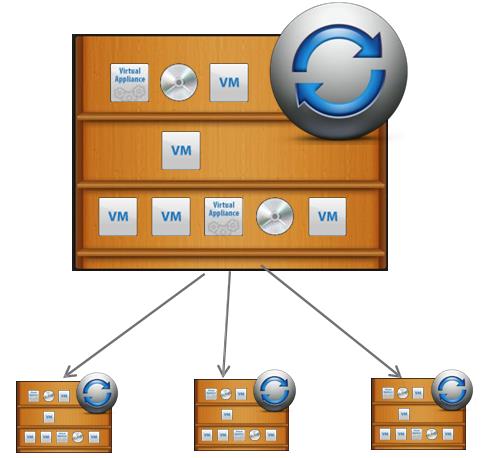
Content Library is the new feature introduced with vSphere 6.0. vCenter’s Content Library provides simple and effective management of VM templates, vApps, ISO images and scripts for vSphere admins. Content Library centrally stores VM templates, vAPPs, ISO images and scripts. This content can be synchronized across sites and vCenter servers
in your organization. In many environment, NFS mount has been used to
store all ISO images and templates but Content Library will simply the
management of storing VM templates , vApps and ISO images either backed
up by NFS mount or Datastores. Contents of Content library are
synchronized with other vCenter Servers and ensure that workloads are
consistence across your environment.


Benefits of vCenter Content Library:
- Content Library provides storage and versioning of files including VM templates, ISOs and OVFs.
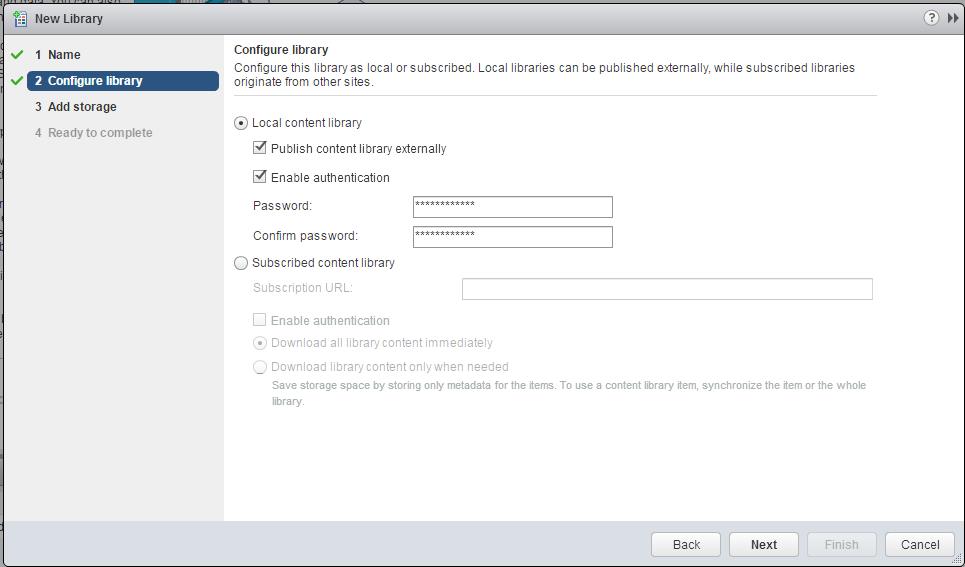
- You can publish the Content Library to public or Subscribe content library to get it synchronized with other vCenter Content Library. You will be able to Publish or Subscribe between vCenter -> vCenter & vCD -> vCenter
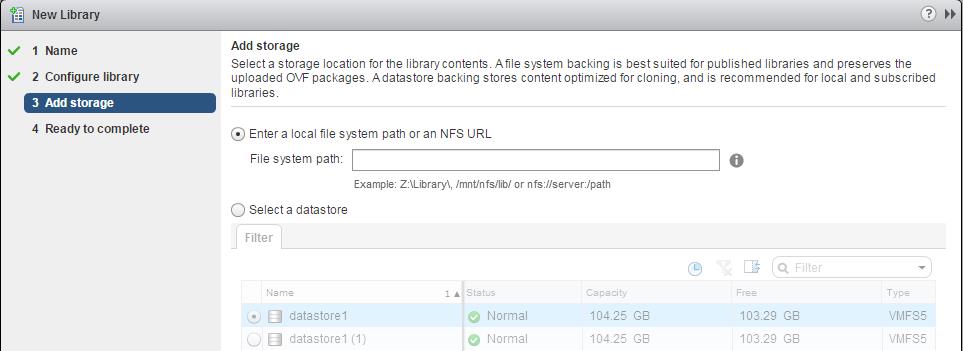
- Content Library basically backed up by vSphere Datastores or NFS file system,which uses this storage to store the library items like VM Templates, ISOs and OVFs.
- You can perform the deployment from the contents stored (templates, ISOs and appliances) in content library to host and clusters. and you can also perform deployment into Virtual Data center.
Friday, June 5, 2015
How to Properly Remove Datastore or LUN from ESXi hosts
This post might be sounds simple that removing datastore from ESXi
host but it is not actually simple as it sounds. VMware Administrators
might think that right-click the datastore and unmounting. It is not
only the process to remove LUN from ESXi hosts but there are few
additional pre-checks and post tasks like detaching the device from the
host is must before we request storage administrator to unpresenting the
LUN from the backend storage array. This process needs to be followed
properly otherwise it may cause bad issues like APD (All Paths Down)
condition on the ESXi host. Lets review what is All Path Device (APD)
condition.
AS per VMware “APD is when there are no longer any active paths to a storage device from the ESX, yet the ESX continues to try to access that device. When hostd tries to open a disk device, a number of commands such as read capacity and read requests to validate the partition table are sent. If the device is in APD, these commands will be retried until they time out. The problem is that hostd is responsible for a number of other tasks as well, not just opening devices. One task is ESX to vCenter communication, and if hostd is blocked waiting for a device to open, it may not respond in a timely enough fashion to these other tasks. One consequence is that you might observe your ESX hosts disconnecting from vCenter.“
VMware has did lot of improvements to how to handle APD conditions over the last number of releases, but prevention is better than cure, so I wanted to use this post to explain you the best practices of removing the LUN from ESXi host.
2. Ensure the Datastore is not used for vSphere HA heartbeat.
3. Ensure the Datastore is not part of a Datastore cluster and not managed by Storage DRS.
4. Datastore should not be used as a Diagnostic coredump partition.
5. Storage I/O control should be disabled for the datastore.
6. No third-party scripts or utilities are accessing the datastore.
7. If the LUN is being used as an RDM, remove the RDM from the virtual machine. Click Edit Settings, highlight the RDM hard disk, and click Remove. Select Delete from disk if it is not selected, and click OK. Note: This destroys the mapping file, but not the LUN content.
2. Select the ESXi host-> Configuration-> Storage-> Datastores. Note down the naa id for that datastore. Which starts something like naa.XXXXXXXXXXXXXXXXXXXXX.

 Image thanks to shabiryusuf.wordpress.com
4. Confirm Datastore unmount pre-check is all marked with Green Check mark and click on OK. Monitor the recent tasks and Wait till the VMFS volume shows as “unmounted”.
Image thanks to shabiryusuf.wordpress.com
4. Confirm Datastore unmount pre-check is all marked with Green Check mark and click on OK. Monitor the recent tasks and Wait till the VMFS volume shows as “unmounted”.
 Image thanks to shabiryusuf.wordpress.com
5.Select the ESXi host-> Configuration-> Storage-> Devices.
Match the devices with the naa.id (naa.XXXXXXXX) which you have noted
down in step 2 with the Identifier. Select the device which has same
naa.id as the unmounted datastore. Right-click the device and Detach. Verify all the Green checks and click on Ok to detach the LUN
Image thanks to shabiryusuf.wordpress.com
5.Select the ESXi host-> Configuration-> Storage-> Devices.
Match the devices with the naa.id (naa.XXXXXXXX) which you have noted
down in step 2 with the Identifier. Select the device which has same
naa.id as the unmounted datastore. Right-click the device and Detach. Verify all the Green checks and click on Ok to detach the LUN
 Image thanks to shabiryusuf.wordpress.com

6. Repeat the same steps for all ESXi hosts, where you want to unpresent this datastore.
7. Inform your storage administrator to physically unpresent the LUN from the ESXi host using the appropriate array tools. You can even share naa.id of the LUN with your storage administrator to easily identify from the storage end.
8. Rescan the ESXi host and verify detached LUNs are disappeared from the ESXi host.
That’s it. I hope this post helps you understand the detailed procedure to properly remove the Datastore or LUN from your ESXi host. Thanks for Reading!!!. Be Social and Share it in Social media. if you feel worth sharing it.
AS per VMware “APD is when there are no longer any active paths to a storage device from the ESX, yet the ESX continues to try to access that device. When hostd tries to open a disk device, a number of commands such as read capacity and read requests to validate the partition table are sent. If the device is in APD, these commands will be retried until they time out. The problem is that hostd is responsible for a number of other tasks as well, not just opening devices. One task is ESX to vCenter communication, and if hostd is blocked waiting for a device to open, it may not respond in a timely enough fashion to these other tasks. One consequence is that you might observe your ESX hosts disconnecting from vCenter.“
VMware has did lot of improvements to how to handle APD conditions over the last number of releases, but prevention is better than cure, so I wanted to use this post to explain you the best practices of removing the LUN from ESXi host.
Pre-Checks before unmounting the Datastore:
1.If the LUN is being used as a VMFS datastore, all objects (such as virtual machines, snapshots, and templates) stored on the VMFS datastore are unregistered or moved to another datastore using storage vMotion. You can Browse the datastore and verify no objects are placed on the datatsore.2. Ensure the Datastore is not used for vSphere HA heartbeat.
3. Ensure the Datastore is not part of a Datastore cluster and not managed by Storage DRS.
4. Datastore should not be used as a Diagnostic coredump partition.
5. Storage I/O control should be disabled for the datastore.
6. No third-party scripts or utilities are accessing the datastore.
7. If the LUN is being used as an RDM, remove the RDM from the virtual machine. Click Edit Settings, highlight the RDM hard disk, and click Remove. Select Delete from disk if it is not selected, and click OK. Note: This destroys the mapping file, but not the LUN content.
Procedure to Remove Datastore or LUN from ESXi 5.X hosts:
1. Ensure you have reviewed all the pre-checks as mentioned above for the datastore ,which you are going to unmount.2. Select the ESXi host-> Configuration-> Storage-> Datastores. Note down the naa id for that datastore. Which starts something like naa.XXXXXXXXXXXXXXXXXXXXX.

3.Right-click the Datatsore, which you want to unmount and Select Unmount.
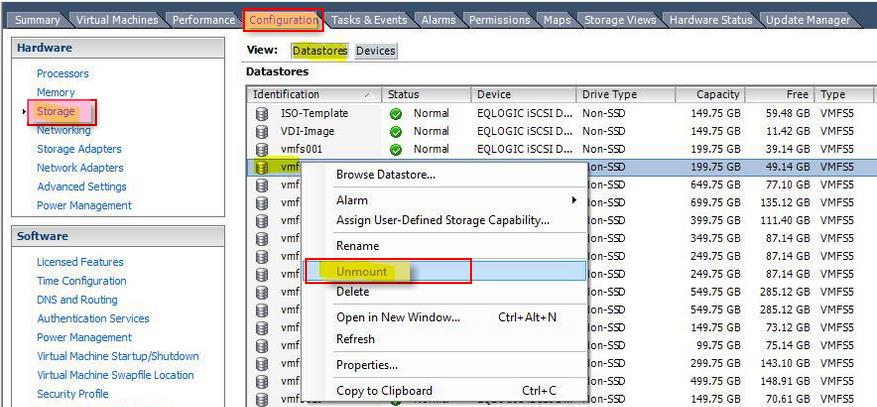 Image thanks to shabiryusuf.wordpress.com
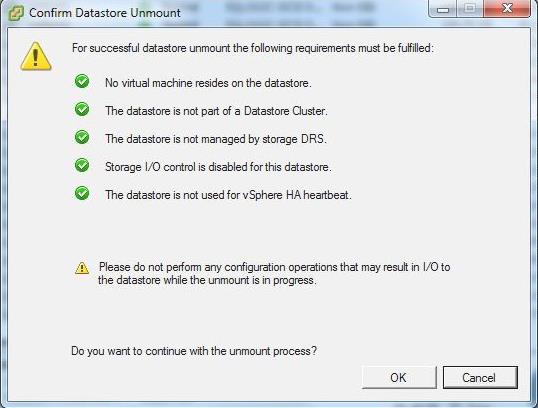 Image thanks to shabiryusuf.wordpress.com
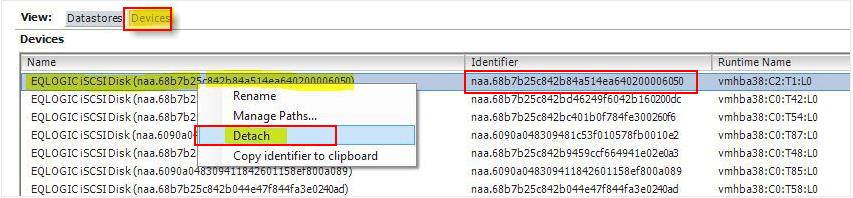 Image thanks to shabiryusuf.wordpress.com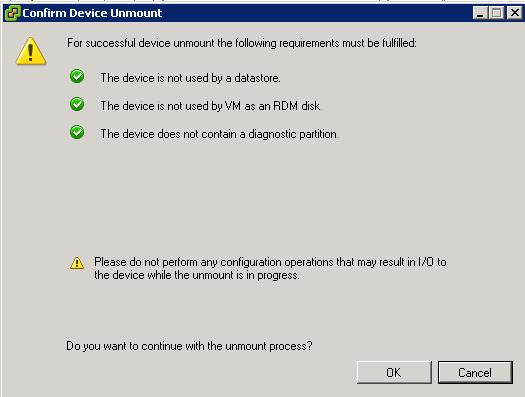
6. Repeat the same steps for all ESXi hosts, where you want to unpresent this datastore.
7. Inform your storage administrator to physically unpresent the LUN from the ESXi host using the appropriate array tools. You can even share naa.id of the LUN with your storage administrator to easily identify from the storage end.
8. Rescan the ESXi host and verify detached LUNs are disappeared from the ESXi host.
That’s it. I hope this post helps you understand the detailed procedure to properly remove the Datastore or LUN from your ESXi host. Thanks for Reading!!!. Be Social and Share it in Social media. if you feel worth sharing it.
Saturday, May 9, 2015
vCenter Server Appliance (vCSA) 6.0 - What's New
What’s new in the vCenter Server Appliance (vCSA) 6.0:

What are we missing:


- ISO with an easy guided Installer
- Different deployment options possible during the guided installer such as:
- Install vCenter Server
- Install Platform Services Controller
- Install vCenter Server with an Embedded Platform Controller (default)
- Scripted install. Values can be specified in a template file
- Embedded vPostgres database. As external database Oracle is supported.
- IPv6 Support
- Enhanced Linked mode support
- VMware Data Protection (VDP) support for backup and recovery
- Based on a hardened Suse Linux Enterprise 11 SP3 (64-bit)
- The minimum (Up to 20 hosts and 400 VMs) appliance requirements for the VCSA are:
- 2 vCPU
- 8 GB memory
- ~ 100 GB diskspace
- Is has the same feature parity as vCenter Windows:

What are we missing:
- Still no Microsoft SQL database support.
- Possibility to separate roles of the vCenter
- VMware Update Manager is not included in the appliance. Still need an additional Windows Server for VMware Update Manager (VUM)
- Clustering of the vCenter Server Appliance


Tuesday, May 5, 2015
RHELAH
Red Hat also saw the technical advantages of a lean, mean Linux. They started working on it in Project Atomic. This open-source operating system is now available as variations on Fedora, CentOS, and RHEL.
From this foundation, Red Hat built RHELAH. This operating system is based on RHEL 7. It features the image-like atomic updating and rollback. Red Hat has committed to Docker for its container technology.
According to Red Hat, RHELAH has many advantages over its competitors. This includes being able to run "directly on hardware as well as virtualized infrastructure whether public or private." In addition, Red Hat brings its support and SELinux for improved security.
From this foundation, Red Hat built RHELAH. This operating system is based on RHEL 7. It features the image-like atomic updating and rollback. Red Hat has committed to Docker for its container technology.
According to Red Hat, RHELAH has many advantages over its competitors. This includes being able to run "directly on hardware as well as virtualized infrastructure whether public or private." In addition, Red Hat brings its support and SELinux for improved security.
Subscribe to:
Posts (Atom)